Firmware
A firmware item (a codebase) holds the code for one board: an Arduino sketch (.ino) plus any headers and source files, and the Arduino libraries it uses.
The editor
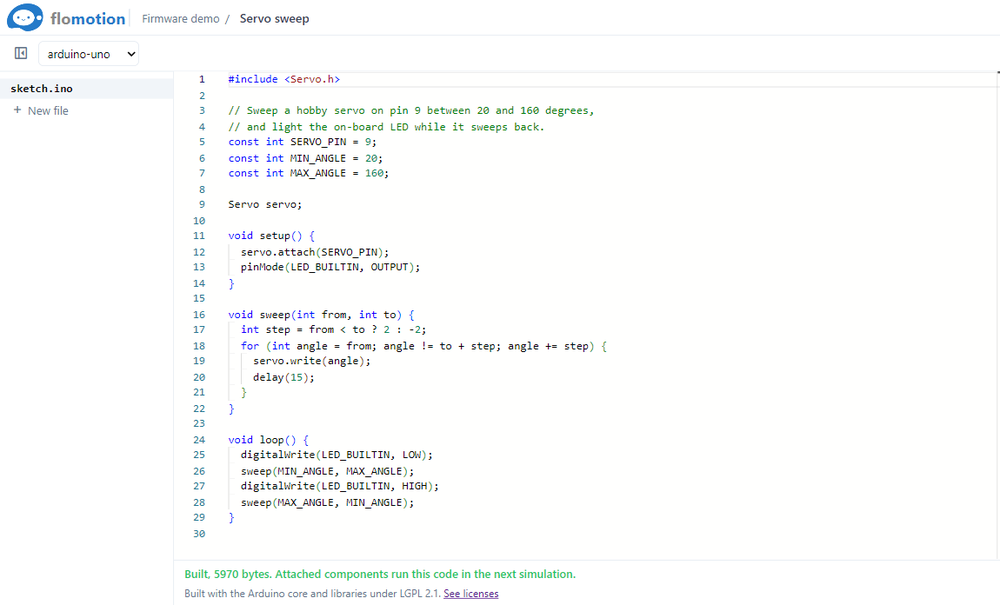
- Toolbar: show or hide the file list, the board picker, a dot when there are unsaved changes, Save and Build.
- File list on the left. New file at its bottom asks for a path, for example
src/motor.h; Enter adds it, Esc cancels. - Editor in the middle, the same one as in Visual Studio Code. Ctrl+S saves.
- AI panel on the right.
- Menus: File and Help, listed below.
A codebase keeps only its latest version; keep anything important in git as well.
Menus
On a Mac, Ctrl is ⌘.
| Menu | Item | Shortcut | What it does |
|---|---|---|---|
| File | Save | Ctrl+S | Saves the open files. |
| Close | Saves, then goes back to the project page. | ||
| Help | Contact Us | Opens a short form to message the team. | |
| Terms of Service | Opens the terms in a new tab. | ||
| Privacy Policy | Opens the privacy policy in a new tab. | ||
| Discord Community | Opens the FloMotion Discord server. | ||
| Reddit (r/FloMotion) | Opens the FloMotion subreddit. |
Boards
The board picker has Arduino Uno, Arduino Nano, Arduino Mega, ESP32 DevKit, ESP32-C3, ESP32-S3 and Raspberry Pi Pico.
Build
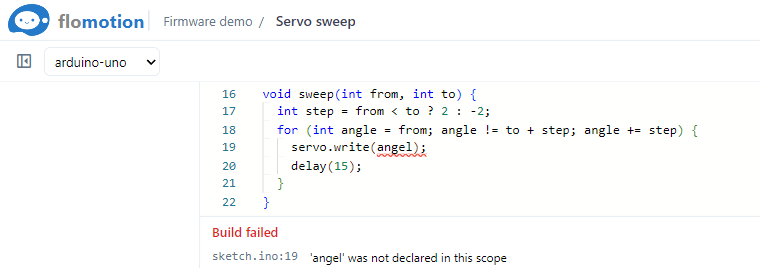
Build compiles the code on the server with the board vendor's official Arduino core. Errors and warnings list under the editor with file and line ("Build failed"); click one to jump to it.
Running it in a circuit
The agent attaches a codebase to a board part in a schematic of the same project, mapping the part's pins to the board's pin names. Ask it, for example, "attach this code to the Uno". When that schematic is simulated, the board runs the latest successful build, and Serial shows its output.