Forward and inverse robot kinematics
October 29, 2026
A robot's motors only know their own angles. A task almost always asks for something in space: put the gripper over that block, keep the cup level, plant the foot ten centimetres ahead. Kinematics is the geometry that links joint angles to where the links are in space, ignoring masses and forces. Going from joint angles to the pose of the hand is forward kinematics. Going the other way, from a wanted hand pose back to the joint angles that reach it, is inverse kinematics.
This article explains both directions, the three families of methods used to solve inverse kinematics, and how FloMotion uses them in three places: when the agent plans a pose, when a person drags an arm in the viewport, and inside a control script while the scene plays.
Forward kinematics
Forward kinematics starts with the angle of every joint and asks where each link of the robot lands. The calculation walks the chain from the base to the tip. At each step it multiplies the rotation or slide of the joint by the fixed offset to the next joint. Because every joint has one value and every link has a fixed shape, the walk has one answer, and it is fast and exact.
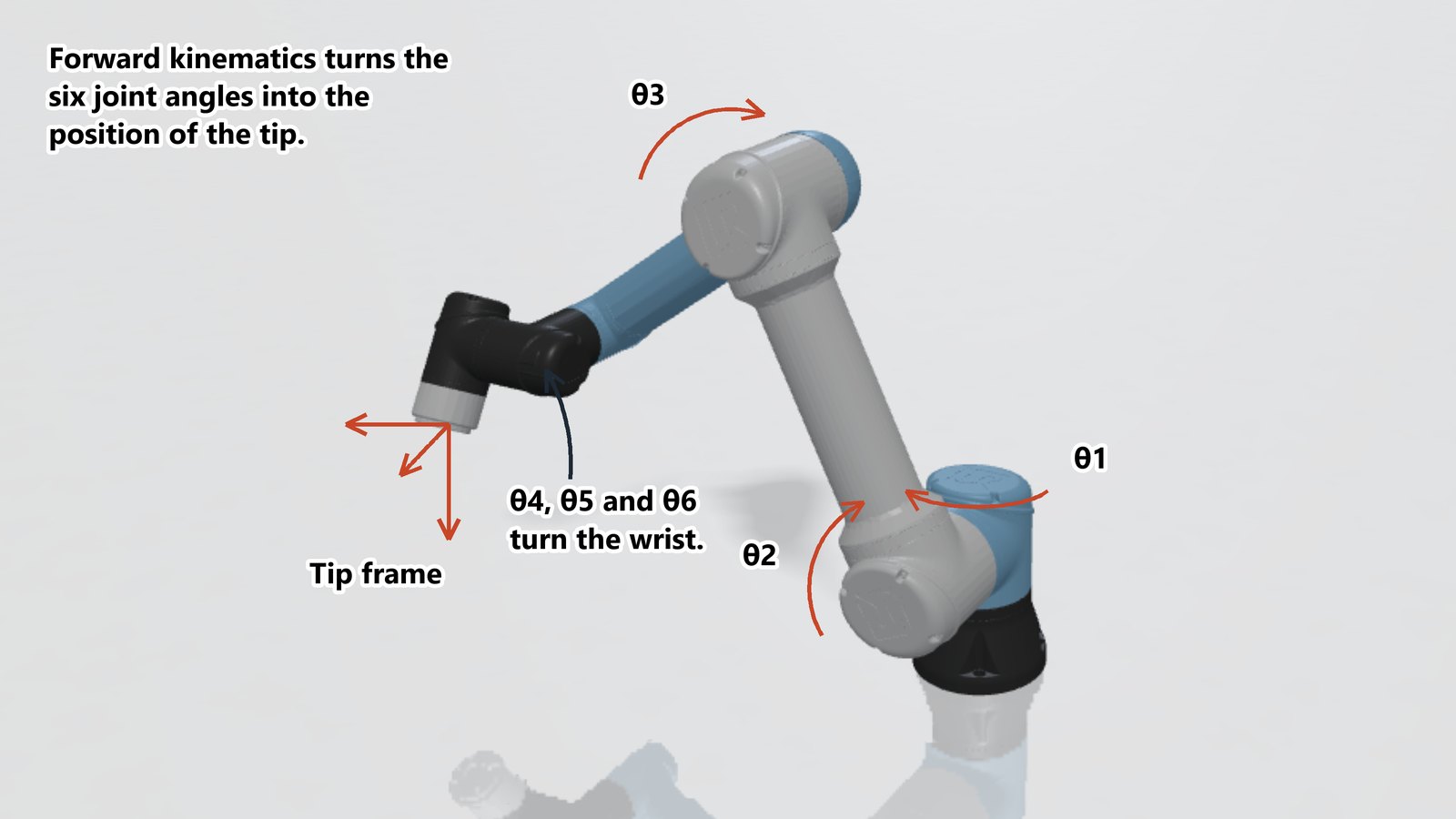
In 1955 Jacques Denavit and Richard Hartenberg showed that each link and joint in a serial chain can be described with four numbers, now called DH parameters. Industrial arm datasheets still print a table of those four numbers per joint. Simulation formats such as URDF and MJCF store the same geometry more directly as a tree of bodies, each with its position, orientation and joint axis relative to its parent.
Inverse kinematics
Inverse kinematics flips the question: given a target position and orientation for the hand or foot, find the joint angles that put it there. Unlike forward kinematics, this rarely has a single clean answer.
No solution. The target may be outside the arm's reach, or reaching it from the right angle may require a joint to turn past its mechanical stop.
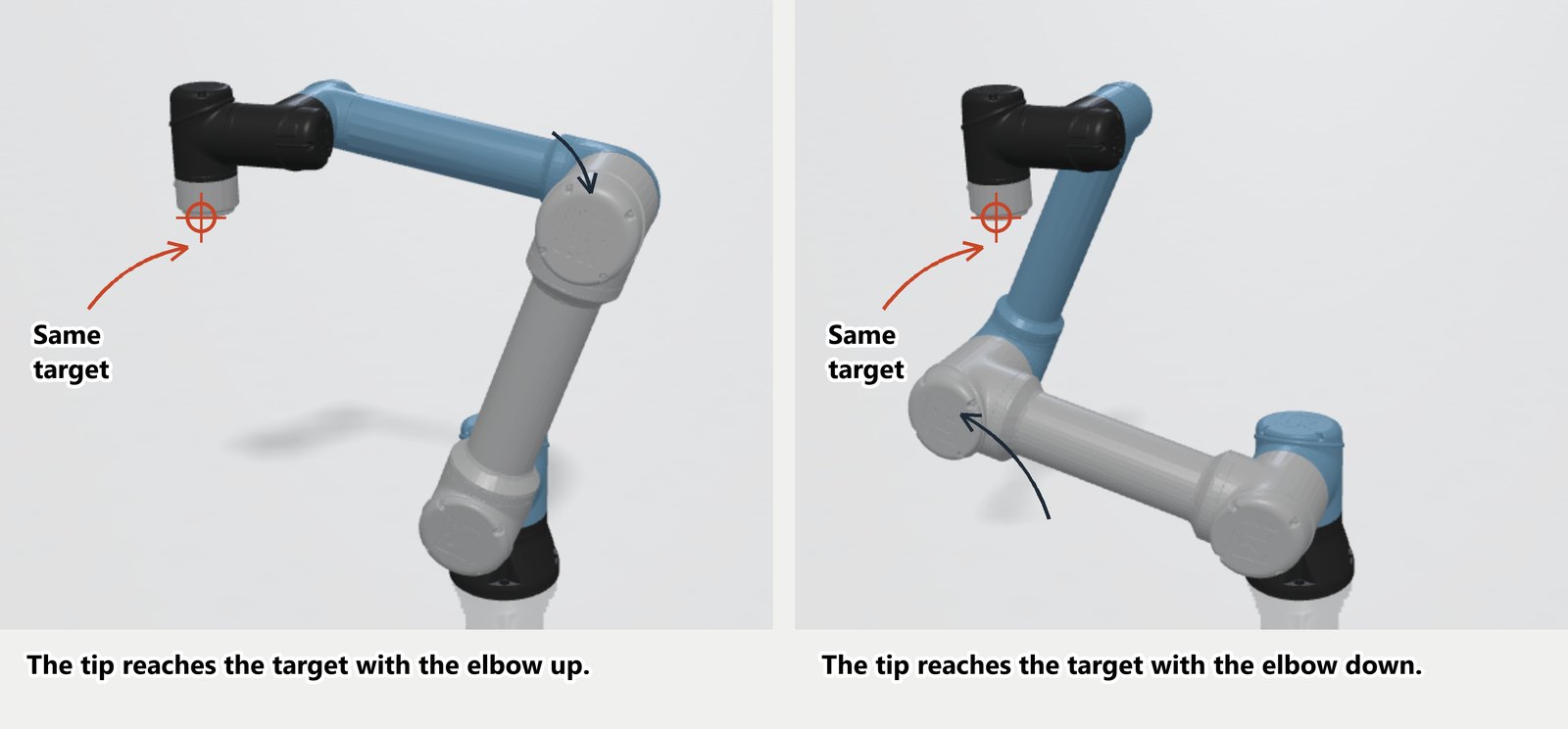
Multiple solutions. A typical six-joint industrial arm can reach most poses in up to eight distinct ways: elbow up or elbow down, shoulder left or shoulder right, wrist flipped or not. The hand ends up in the same place, but the rest of the arm takes a different posture.
Infinitely many solutions. A redundant arm has more joints than the task strictly needs. A seven-joint collaborative arm, or a human arm, can hold the hand completely still while moving the elbow in an arc.
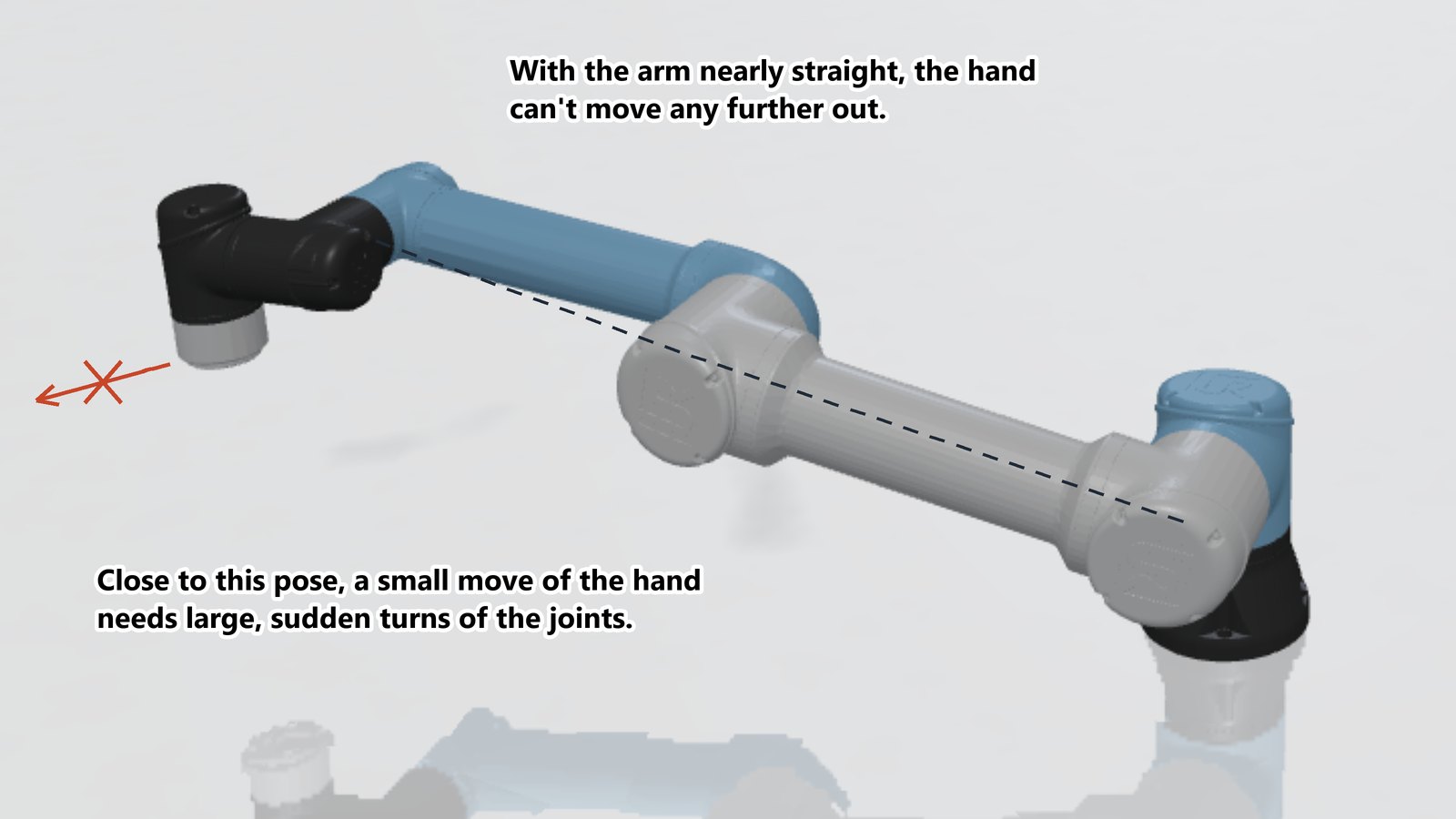
Singularities. In certain postures, such as an arm stretched straight out or two joint axes lined up with each other, the hand loses a direction of motion. Near a singularity, moving the hand a millimetre in the blocked direction requires huge, sudden turns of the joints.
Three families of inverse kinematics
Over the decades, robotics has settled on three ways to solve the inverse problem. Each trades generality against speed and setup work.
Closed-form equations
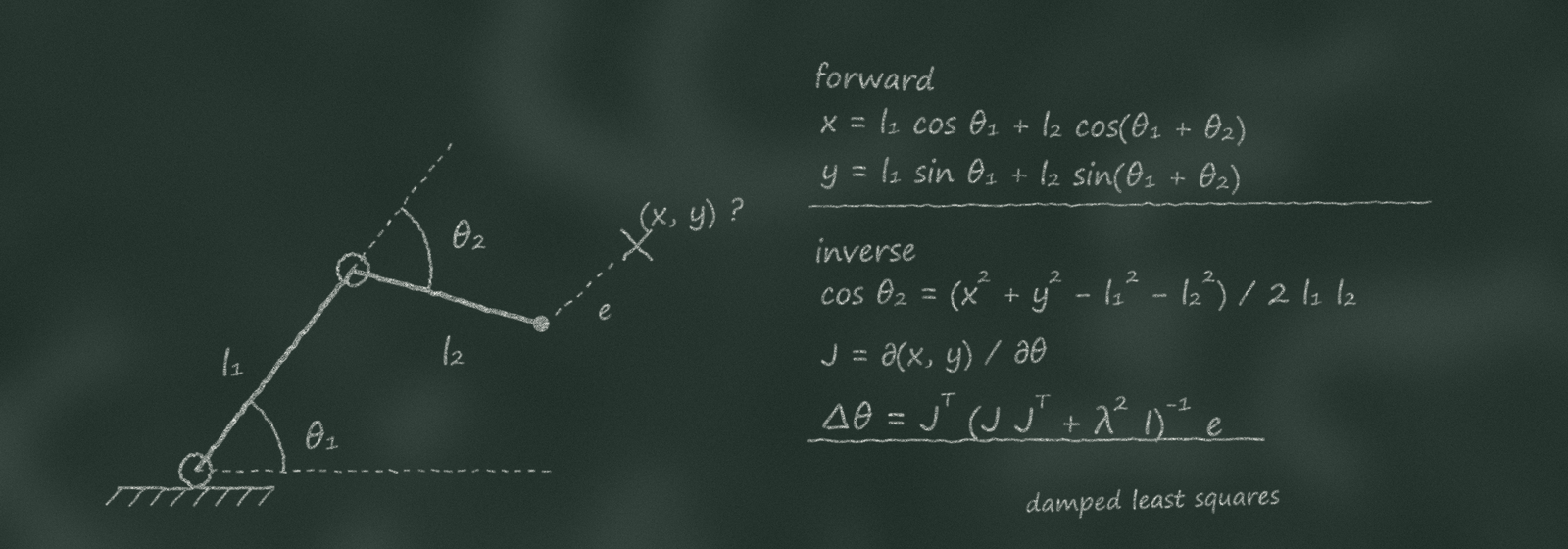
For simple chains, the geometry can be inverted on paper with trigonometry. A planar two-link arm reduces to a triangle: the law of cosines gives the elbow angle from the distance to the target, and the shoulder angle follows from the target's direction. This is small and fast enough to run on an 8-bit microcontroller driving a hobby arm.
In 1968 Donald Pieper showed that any six-joint arm whose last three joint axes meet at a single point also has a closed-form solution. The meeting point acts as a spherical wrist: the first three joints place the wrist centre, and the last three set the hand's orientation. That result is the reason most six-axis industrial arms are built with a spherical wrist. Closed-form solvers are exact, run in microseconds and return every possible posture at once, but they must be derived specifically for one arm's geometry.
Jacobian methods
A general solver cannot assume a spherical wrist or a fixed number of joints. Instead, it starts from the current pose and takes small steps toward the target. The tool for each step is the Jacobian: a matrix, computed from forward kinematics, that says how far the hand moves in each direction for a small turn of each joint.
Daniel Whitney introduced this in 1969 as resolved motion rate control. Inverting the Jacobian gives the small joint moves that produce a small move of the hand toward the target. The solver steps the joints, recomputes forward kinematics and the Jacobian, and repeats until the hand arrives.
Three variants handle the matrix step:
- Pseudoinverse. Gives the smallest joint move for the wanted hand move, even on arms with extra or fewer joints. Near a singularity, however, the inverted values blow up and ask for enormous joint speeds.
- Jacobian transpose. Pushes the joints using the transpose of the matrix instead of its inverse. It never blows up at singularities, at the cost of taking many small steps to converge.
- Damped least squares. Introduced independently in 1986 by Charles Wampler and by Yoshihiko Nakamura and Hideo Hanafusa, this adds a small damping term before inverting. The damping keeps the joint steps bounded right through a singularity, while staying fast elsewhere. It is the default in much of robotics and character animation software.
Jacobian solvers take refinements well. On a redundant arm, the extra freedom (the null space of the Jacobian) can be used to pull joints toward the middle of their ranges while the hand stays on target. Per-joint weights can make heavy base joints stiffer or looser than wrist joints, and joint limits are handled by clamping at each step. Because the Jacobian comes straight from the model file, the same solver works on any chain. The catch is that it only walks downhill from the starting pose: it finds one nearby solution and can get stuck against a joint limit. Running it again from random starting poses helps when the first attempt gets stuck.
Optimisation
The most general approach treats inverse kinematics as a numerical optimisation problem: minimise the distance to the target, subject to joint limits, while adding penalty terms for link collisions, awkward postures or jerky motion. Solvers such as TRAC-IK, widely used with ROS, run a fast Jacobian solver and a general nonlinear optimiser side by side and take whichever finishes first. Motion planners solve sequences of these problems to find a whole collision-free path. The flexibility costs time: a single solve takes from a few milliseconds to several seconds.
Where each appears in FloMotion
FloMotion uses forward kinematics continuously, and two damped least squares solvers for inverse kinematics. One runs on the server for the AI agent planning a pose. The other runs in the browser, for a person dragging a robot in the viewport and for a control script tracking a target while the scene plays.
The agent reaches all of them through its kinematics skill, which holds the forward check and both inverse solvers. When writing a script, it uses the server solver ahead of time for fixed poses, and in-script requests when the target moves during the run.
Forward kinematics in the scene and for the agent
While a scene runs, MuJoCo computes forward kinematics for every body of every robot many times a second. The 3D viewport is drawn directly from those body transforms.
The agent also has a solve_forward_kinematics tool. Given a set of joint values, it returns where each body and a chosen tool point land in space without moving the robot in the scene. The agent uses this to preview a pose or check where a hand will end up before committing to a move.
The agent's inverse kinematics solver
When the agent needs a robot to reach a point in space, whether to write a pick-and-place script, set up a keyframe pose, or check if a table is within reach, it calls solve_inverse_kinematics on the server.
This solver runs damped least squares on the Jacobian with several additions suited to planning:
- Collision avoidance. It checks the robot against the ground, placed objects, other robots in the scene and its own links. Any penetration adds a term that pushes the offending links apart.
- Random restarts. If the first descent from the current pose gets stuck in a local minimum or behind an obstacle, the solver retries from up to 40 random starting postures and keeps the best attempt.
- Null-space posture. On redundant arms, a secondary pull nudges joints toward the middle of their ranges so the solution avoids extreme angles. This can be turned off when a specific posture is wanted.
- Partial chains and closed loops. An optional base link lets the solver move only part of a robot, such as one leg of a walker while the torso stays put. On mechanisms with closed kinematic loops, such as a four-bar linkage, it keeps the loop closed while solving.
- Tool points and orientations. The target can specify position alone or both position and orientation, measured at a chosen offset on the end link such as the tip of a gripper finger.
If a target is out of reach or blocked, the solver returns the closest approach it found along with the reason it stopped. Most calls return right away; a solve that takes more than two seconds continues as a background job so the chat does not hang. While the solver handles geometry and collisions well in practice, it only sees the single target pose, not the path taken to get there, so the resulting motion in the scene is still worth watching.
The reach handle in the viewport
While a scene plays in the browser, a person can grab a robot link by its reach handle and drag it with the mouse. Here the goal is not to plan from scratch, but to follow the cursor smoothly at frame rate.
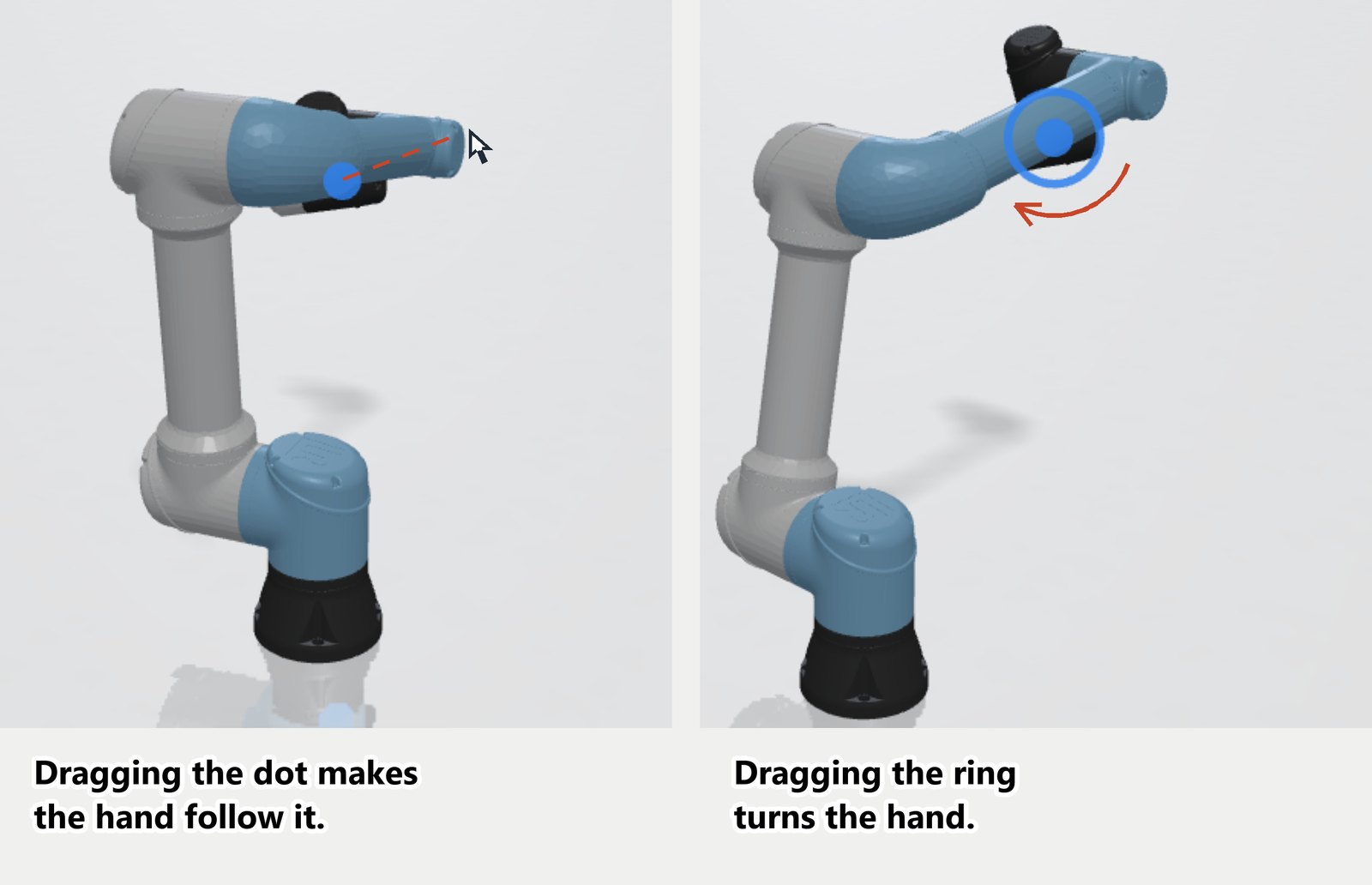
Every control step, the browser runs eight iterations of weighted damped least squares on MuJoCo's own Jacobian, starting from the robot's current pose. Step sizes are clamped and joints are kept inside their ranges. A ring around the handle lets the user rotate the hand's orientation, weighted lower than position so the tip stays on the cursor first. Joints that are coupled to another joint, such as parallel gripper fingers, follow their leading joint automatically.
Left unweighted, a Jacobian solver lets the wrist joints take a large share of each small move, and a dragged wrist folds back on itself. The reach handle weights the joints so that joints nearer the base move more readily than those near the hand, and the handle's own joint moves least of all. The result feels like pulling a real arm by the wrist: the shoulder and elbow swing out to carry the hand.
The solved angles are not teleported onto the bodies. On a robot with position servos, they become the new servo targets, so the arm moves at its motor speed and stops if it meets a wall. On an unmotorised arm, the solver pulls the joints toward the solution with a virtual torque, and when the handle is released the arm stays wherever friction holds it.
Inverse kinematics inside a control script
A control script can also call the browser's weighted solver while the scene runs, to follow a moving object or trace a path that is computed on the fly. The script calls ik.request with a link, a point on that link, a target position, and an optional orientation.
The browser solves the request between control steps from the robot's current pose, using the same weighted damped least squares solver as the reach handle, without collision avoidance. The answer arrives on the script's next step with the joint targets, whether the target was reached or only approached as closely as possible, and the remaining error in millimetres. A script that tracks a moving target sends one request per step and applies each answer on the step after.
Where inverse kinematics is skipped on purpose
Not every way of moving a robot needs an inverse solver, and two workflows in FloMotion deliberately avoid it.
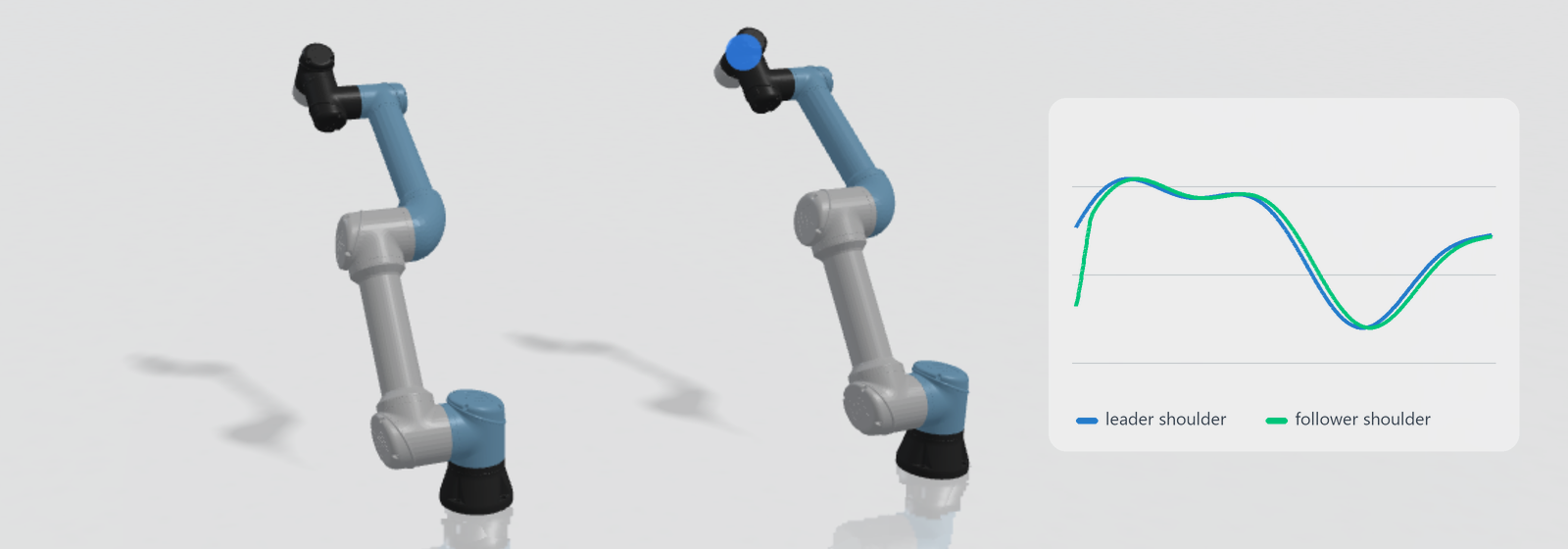
Leader-follower teleoperation. With a physical leader arm such as GELLO, the leader is built with the same joint layout as the follower robot. The follower simply copies the leader's joint angles one to one, with a sign and offset per joint. Because every joint is matched directly, the whole posture of the arm is reproduced without any Jacobian or singularity issues. The article on leader-follower teleoperation goes through this setup.
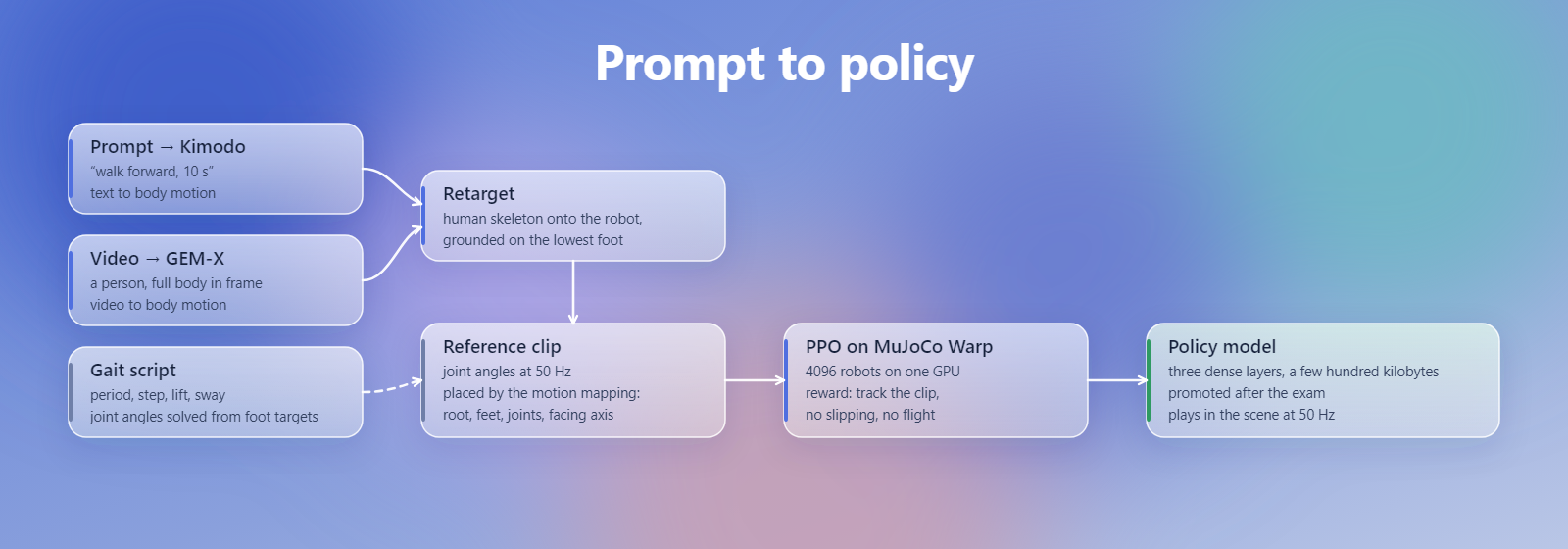
Motion retargeting and policies. When a human motion is lifted from video or generated from a prompt in prompt to policy, it is mapped onto a humanoid by copying the rotations of the human skeleton's joints onto the corresponding robot joints, rather than solving for hand and foot positions in space. Once the reference clip is made, the reinforcement learning policy trains to output joint target angles directly from sensor readings, running at fifty times a second with no kinematics solver in the loop.
Limits
- The reach handle in the viewport does not avoid collisions while solving. Instead, the arm meets obstacles through the physics simulation and can push light objects aside.
- The solvers find one solution near their starting pose. Reaching a target that needs the elbow flipped to the other side requires a different start, which the agent's solver searches for with its random restarts.
Summary
Forward kinematics walks a robot's chain from base to tip to find where each link sits in space, while inverse kinematics works backward from a wanted hand pose to the joint angles that reach it. Closed-form equations solve specific arm geometries on paper, Jacobian methods step any chain toward a target using local derivatives, and optimisation solvers add broader constraints at a higher time cost. In FloMotion, MuJoCo and the agent use forward kinematics to place and preview bodies, the agent uses a server-side damped least squares solver with collision checks and restarts to plan poses, and the viewport's reach handle runs a lightweight weighted solver in the browser so an arm can be dragged smoothly by hand.
Links
- MuJoCo documentation, whose
mj_jacfunction computes the Jacobians used by both solvers. - Introduction to Inverse Kinematics with Jacobian Transpose, Pseudoinverse and Damped Least Squares methods by Samuel Buss.
- TRAC-IK, an inverse kinematics solver that pairs a Jacobian solver with nonlinear optimisation.
Try it yourself
Open the workspace, describe a part, and see what the agent does with it. No install, no setup. Sign-in is optional for the first run.
Start building