From prompt to policy
October 20, 2026
One of the hard problems in robotics is motion that looks natural and smooth and also works in the physical world. Compared with simple playback of the motion in a 3D viewport, a physical robot has mass, friction and balance to deal with, and the same motion is only useful if the robot can execute it without falling over. This article goes through how walking controllers came to be written, then follows a walk from a sentence to a trained policy playing in a FloMotion scene, which is the pipeline built for that problem.
How robots learned to walk
Three approaches to walking controllers have followed each other, and each one is still in use somewhere.
Hand-written gait cycles. The first walking machines, and most hobby bipeds and hexapods today, play a fixed cycle of joint angles: lift the leg, swing it forward, put it down, shift the weight, repeat. The cycle is tuned by hand until the robot stays up, and it works as long as nothing pushes the robot and the floor is flat. A push, a slope or a heavier battery means tuning it again.
Model based control. Humanoids such as Honda's ASIMO from 2000 onwards compute each step from a physical model of the body, keeping a point called the zero moment point inside the foot. This handles pushes and uneven ground, but the model has to be built and tuned for every robot, and the resulting walk is cautious.
Motion capture and learned policies. From about 2018 a third approach took over, first in animation and then in robotics. A recorded motion, from capture markers or a camera, shows what the movement should look like. A learning algorithm trains a small neural network in simulation until it follows the recording without falling. The network is the controller, called a policy. It takes the robot's joint angles, speeds and lean, and returns a target for each joint, fifty or so times a second. Because it was trained under pushes and small variations, it recovers from them on its own. The recording tells it what to do; the training tells it how to stay up while doing it.
That is the approach a FloMotion control policy follows. The parts are a reference clip, a mapping from the clip onto the robot, a reward, a training run and the model it produces.
The training lifecycle
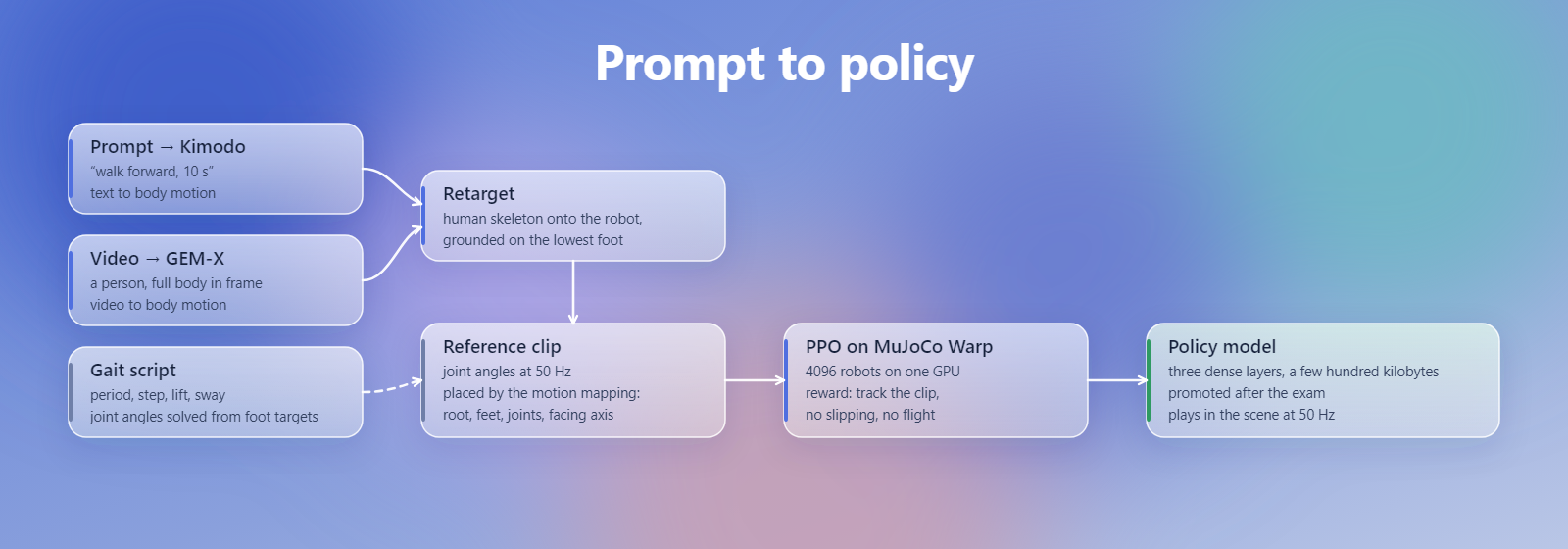
The input of the process is a description of the target motion: a text prompt, a video, or a gait script written by hand. The output is a policy model that plays in the scene. Between the two are four stages: a motion is generated from the input, the motion is retargeted onto the robot as a reference clip, a reward is set up for the clip, and a training job runs on a server GPU and produces models.
The agent runs these stages from the chat through a motion skill. During training it reads the training curve and the evaluation numbers, and decides whether to wait, stop the job or resume it with changed settings. A model that scores well enough is promoted and can be played in the scene.
Most policies take several rounds. Typical reasons to go back a stage are a clip that is too fast for the robot's motors, a reward that favours standing still, or a training run that plateaus early. Every attempt is kept on the policy: the inputs, the motions, the clips, every training run and every model. A run that went wrong can be compared against later ones, each model is traceable back to its input, and a later experiment does not displace the promoted model unless it scores at least as well.
The policy panel next to the viewport shows the same data. It can play the clip, show the training curve, and a model can be manually promoted from it.
Where the motion comes from
A policy only learns to balance what the clip already does, so the clip is where most of the attention goes. There are three sources.
A prompt. A sentence such as walk forward, then turn left goes to Kimodo, NVIDIA's kinematic motion diffusion model, which generates about ten seconds of human body motion at 30 frames a second. The model runs in FloMotion's own GPU job, so the prompt is not sent to a third party.
A video. A phone clip of a person doing the motion goes to GEM-X, which lifts the body motion from monocular video. One person, the full body in frame, a steady camera and five to twenty seconds of footage give the best result. A video takes three to five minutes, most of it starting the GPU machine.
A gait script. For a body unlike a human, a short JavaScript script writes the motion directly. The script sets a cycle period, a step length, a foot lift and a side sway toward the standing foot, and solves the joint angles from where the feet should be. It is recorded for one cycle into a clip, the same way a control script drives a scene by hand.
Both generated sources produce human motion on a standard skeleton. The robot is rarely human shaped, which is what the mapping is for.
The motion mapping
The mapping says which body of the robot is the pelvis, which bodies are the feet, how each robot joint corresponds to a joint of the skeleton, and which way the robot faces. The agent proposes it from the assembly tree, or applies a ready made one for robots from the robot library, and it can be edited by hand.
Retargeting then turns the skeleton motion into joint angles for the robot: a few hundred frames of vector maths and one forward kinematics pass, done at once when asked. The result is a clip, joint angles at 50 Hz with the pelvis path and the foot contacts, grounded so the lowest foot touches the floor. A retargeted clip is played in the viewport without physics first. A limb bending the wrong way reads as a sign error in the mapping, and a stride that penetrates the floor or lifts the feet by a millimetre comes from human proportions on a short leg.
The script route needs the mapping too, for the pelvis and the feet, but skips the retarget. On a biped with 25 cm legs and wide hips a retargeted human walk toppled in half a second when played open loop under physics, where a scripted gait with a 1.1 s cycle, 10 cm steps and 1.5 cm of foot lift stood for the full test. The script was the clip that trained.
The reward
The reward is a short expression that scores every simulation step, and it is where the intent of the motion is spelled out. The terms that work are tracking terms: how far the joints are from the clip, how far the pelvis height, lean and heading are from it, how far the feet are from where the clip has them, scaled by whether the robot moves at the speed of the clip. Penalties go on what should not happen: a foot that slides while it touches the ground, both feet in the air, large or jittery actions.
Terms that pay for a posture instead of for tracking get exploited. A bonus for standing on one leg is collected by holding the other foot in the air and hopping. A bonus for step length is collected by splitting the legs and standing still. Each term also reports as a metric, so the training entry shows where the score comes from.
Training
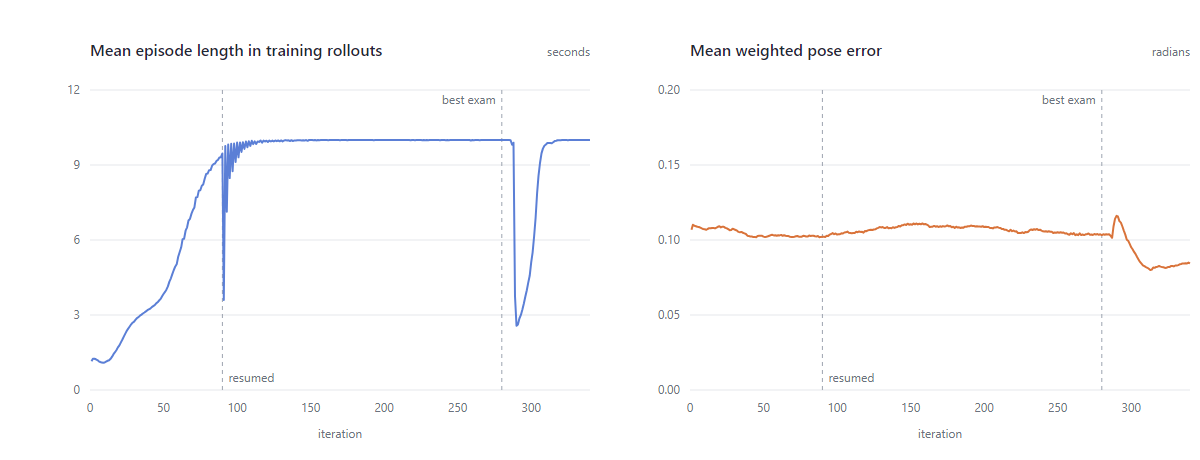
A training run simulates the robot on a server GPU and improves the policy in iterations of a few seconds each. Every ten iterations the current policy sits an exam in the classic simulator, ten episodes of thirty seconds from fixed points of the clip with no exploration noise, scored half on survival and half on reward. The best exam seen is the model the run exports.
A fresh biped reaches full survival in 150 to 300 iterations, 25 to 45 minutes, and the run stops on its own when the exam has not improved for a while. A change of reward, mapping or clip is tried by resuming the run from its checkpoint rather than starting over, which keeps the chain of entries and the time already spent.
Automatic promotion only compares exam numbers, and the exam cannot tell how a model survived. A model that hops on one leg or drifts sideways can score above a clean walker. So the model is played in the scene before it is promoted: travel along the intended axis, both feet alternating, swing times near the clip's, no foot held in the air.
The model in the scene
A policy model is a small neural network of a few hundred kilobytes. Attached to a scene, it runs in the browser inside the simulation loop at the rate it was trained at. It plays alongside everything else a scene holds: the control pad, emitters, other robots and control scripts, which can send it commands.
The same walker, after its run on the GPU: it walks straight along the clip at 0.27 m/s, both feet in contact half the time each, and its feet slip less than two centimetres a second while they touch the ground.
Cost
GPU work is billed at one credit per GPU minute, charged while the job runs, with the same credits that pay for agent iterations. A motion from a prompt or a video costs three to five credits, most of it the start of the GPU machine. A training run for a fresh biped takes 25 to 45 minutes and costs as much in credits; a run that is resumed with a changed reward or clip adds only the minutes it runs. A job is refused if the balance cannot cover it, and a run that exhausts the balance stops with its checkpoint, so it can be resumed after a top up. Playing a trained model in the scene is free, since it runs in the browser. Current rates are on the credit costs page.
Limits
- The agent proposes mappings and rewards and reads the results, but a wrong mapping sign or a reward that rewards the wrong thing is found by watching the clip and the model, not by the numbers alone.
- Training runs on a shared GPU queue with a per user cap on concurrent jobs. A run spans up to about eleven hours.
- Rewards that need a history of past steps train slower.
Summary
A control policy is a small network that keeps a legged robot up while it follows a motion. In FloMotion the motion comes from a prompt, a video or a gait script, is mapped and retargeted onto the robot, and is scored by a reward that tracks the clip and penalises slipping. A GPU training run evaluates the policy as it learns and exports the best model. The model is promoted after being checked in the viewport, and then plays in the scene with everything else in it.
Try it yourself
Open the workspace, describe a part, and see what the agent does with it. No install, no setup. Sign-in is optional for the first run.
Start building