Online electronics editor with AI: agentic schematic generation
May 12, 2026
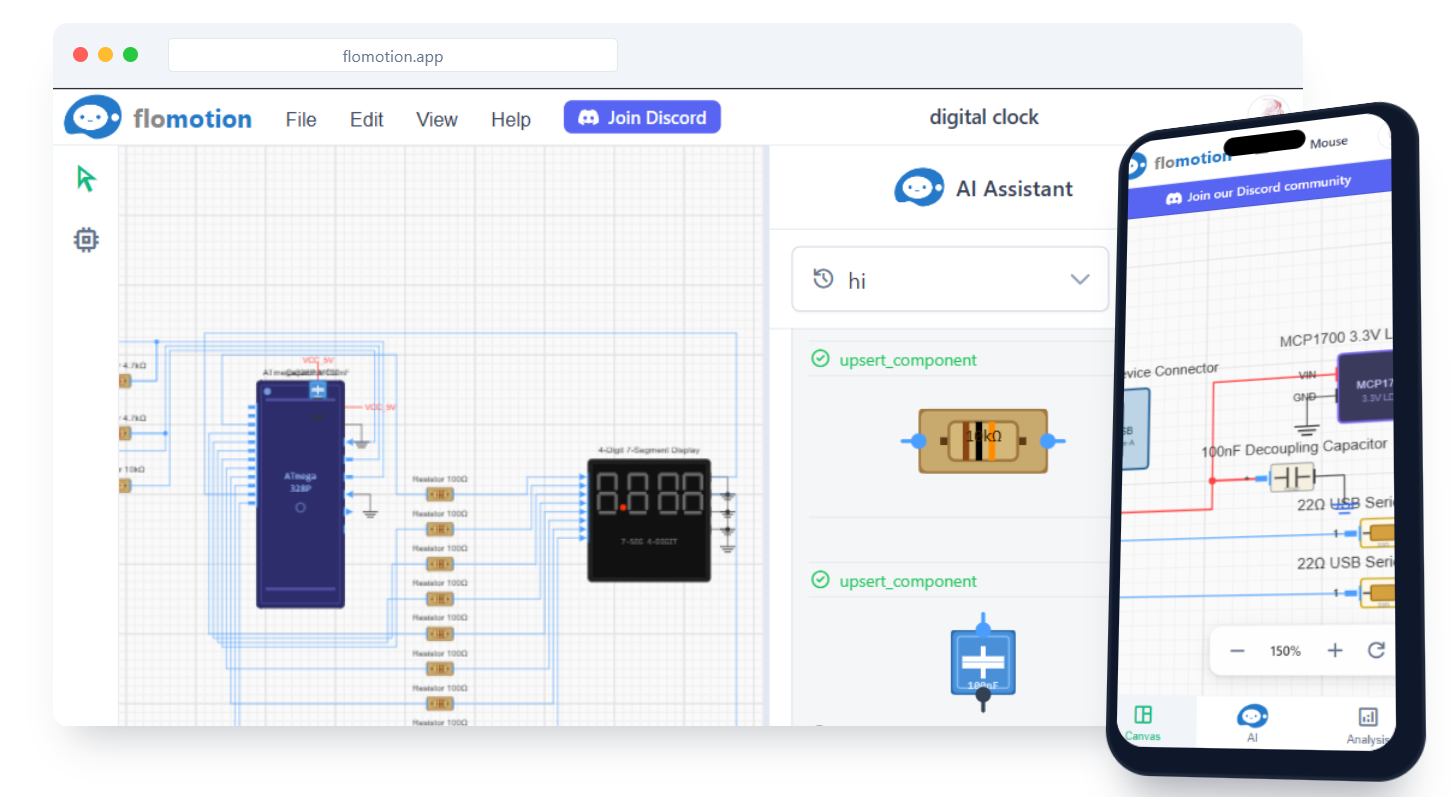
FloMotion runs a schematic editor in the browser and pairs it with an AI agent. You describe a circuit in your own words and the agent picks the components, places them on the canvas, draws the nets, and routes the wires. You can then edit by hand or continue the conversation.
What "agentic" means here
The agent does the work you would otherwise do by hand. You describe the circuit; it picks components, places them, wires them, and routes the schematic. You can keep talking to it to refine the result.
A prompt like "A 9V battery driving an LED through a 470Ω resistor with a switch" results in:
- The right parts pulled from the component library.
- Components placed on the canvas with reasonable positions.
- Nets drawn between the correct pins.
- Wires routed so nothing overlaps.
Follow-up prompts edit the existing design rather than starting over. If you ask "Add a second LED in parallel," the new part is inserted and the affected wires are re-routed. The rest of the layout stays the way you had it.
Browser-based, no install
Nothing to download, nothing to install. Open the site, sign in with Google, start designing.
- Designs are saved to your account and reload on any device you sign in from.
- Editing stays responsive even on larger schematics.
Mobile support
The editor is built for desktop, but mobile is a supported subset rather than an afterthought:
- The chat panel works on any screen size. You can describe changes and watch the agent edit the design on a phone.
- The canvas accepts touch gestures: pinch to zoom, single-finger drag to pan, tap to select.
- Basic editing works on touch: dragging components, triggering a re-route, renaming nets.
- Some desktop-only features (multi-select rectangle, keyboard shortcuts, the full menu bar) are hidden on small screens.
It is reasonable to sketch on a phone and finish on a laptop. It is not reasonable to do a 200-component board layout from a phone.
What is available today
- Prompt-to-schematic generation.
- Iterative editing through chat.
- Manual editing: drag, multi-select, copy/paste, undo/redo.
- Auto-router with full re-route and per-net re-route.
- KiCad export, so you can take a design into a full PCB workflow.
- Project organisation: schematics live inside projects.
- Persistence across sessions and devices.
How to use it
- From the home page, click Start Building. You will land on the projects list, signed-out users are prompted to sign in.
- Create a project. Projects group related schematics and CAD parts.
- Click New schematic inside the project, give it a title.
- The chat panel is on the right. Type a description of the circuit and press enter.
- The agent builds the design. Iterate with follow-up prompts, or edit on the canvas directly.
Try it yourself
Open the workspace, describe a part, and see what the agent does with it. No install, no setup. Sign-in is optional for the first run.
Start building